Use VOIP with Existing Analog Phone Lines
Replace TAPI with VOIP, without requiring an internet connection to the TopView computer.
You don’t need to replace your phone lines to move to VoIP, and you don’t need an internet connection.
With the right setup, you can use VOIP and still make calls over traditional analog phone lines (POTS). This gives you the reliability of modern VoIP without rearchitecting your phone system.
The Problem with TAPI
Many systems still rely on old modems and TAPI drivers to make calls through analog lines.
These setups can be:
- Unreliable after Windows updates
- Hard to support in virtual machines
- Dependent on outdated drivers and hardware
Why VOIP Works Better (even with analog lines)
TopView uses VOIP for Voice Notification calls, allowing network-based phone calls.
Using VoIP with analog lines gives you:
- ✅ Higher reliability than legacy phone APIs
- ✅ Easier setup on virtual machines
- ✅ No dependence on obsolete drivers
- ✅ Continued use of existing phone lines
- ✅ A clear upgrade path for the future
The result is a more stable, easier-to-maintain solution that still works with the phone lines you already have. Learn more about how TopView uses VOIP.
Implement your own IP PBX
You can purchase and configure your own IP PBX (VOIP Server) for TopView Voice Notifications.
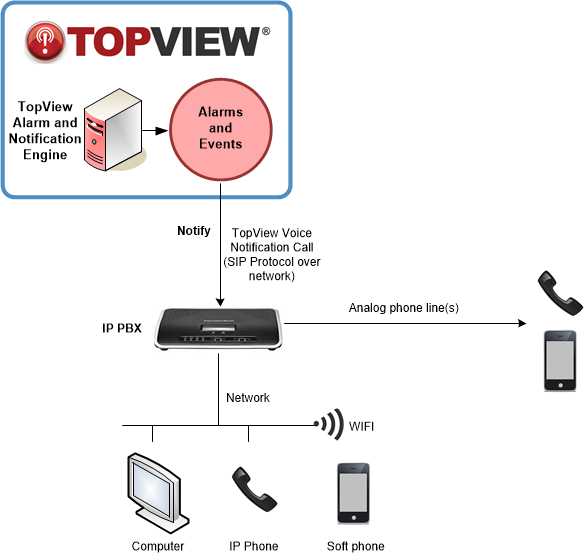
A common configuration looks like this:
- TopView makes VOIP calls over the local network
- An IP PBX receives the call
- The PBX connects the call to an analog phone line
Optional extras:
- Desk phones (IP phones)
- Softphones on PCs, tablets, or smartphones
All of this works using standard network equipment and does not require special phone drivers.
Recommended Hardware
We recommend using Grandstream UCM6200 or UCM6300 series devices.
These provide:
- Built-in VoIP server
- Analog phone line ports
- Reliable call handling
- Simple configuration
- Bring your own VOIP desk phones, or softphones on any platform
- Multiple phone line redundancy
⚠️ Note: Do not use the 6300A model if you need analog line support, as it does not include analog ports.
- See How to Configure the UCM6200/6300 for use with TopView
Includes connecting to your network, configuring the analog line, attaching software phones (optional), and making test calls from TopView - View: the UCM6200 user manual or UCM6300 user manual from Grandstream
- Where to buy