

PI Tuning Tools
As a PI Administrator, you probably have thousands of tags in your PI System. Each tag has compression settings that determine which of the collected values will be stored in the PI Archive. Typically, you have some rules for assigning compression settings based on the type of data. For example, you may set all temperature tags with a compression deviation of .1 engineering units.
The problem with this type of compression assignment is that different tags have different behavior. With the same compression settings, some tags may store a value per second while others store a value per hour. When you look at the tag data in the PI Archive, you are looking at the data after compression. How do you know if the data storage accurately represents the behavior of the tag data? How can you compare pre-compressed tag data with compressed tag data to see what compression is doing to your data?
EXELE PI Tuning Tools allows PI system administrators to easily identify “noisy” tags and to tune those tags and the PI archive through intelligent changes to tag compression settings (compression deviation).
PI Tuning tools consists of 3 applications
- Archive Analysis
Identify the tags that have the most archive events (noisy tags) - Compression Analysis Data Collector
Collect raw data for one or more tags (for use by Compression Analysis) - Compression Analysis
Plot and analyze the raw data values versus compressed data by creating what-if scenarios for various compression deviation settings
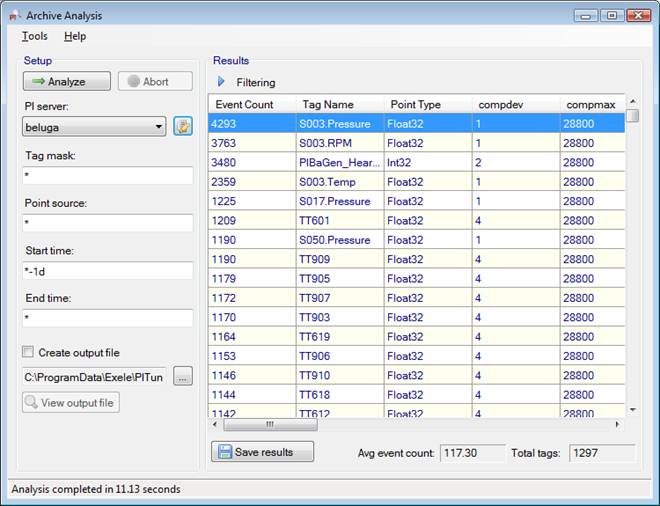
Archive Analysis
Identify noisy or empty PI Tags
- The user enters search criteria similar to OSI’s PI Tag Search. Included in the criteria is a time range for analysis.
- Archive Analysis searches the PI archive and counts the number of archive events for the tags matching the search criteria.
- The results are initially displayed in the application. This includes the number of events, tag name, and description, along with the compression and exception settings for each tag. The user can select additional PI tag attributes for the results.
- The results can be saved to a file that can be imported into Microsoft Excel.
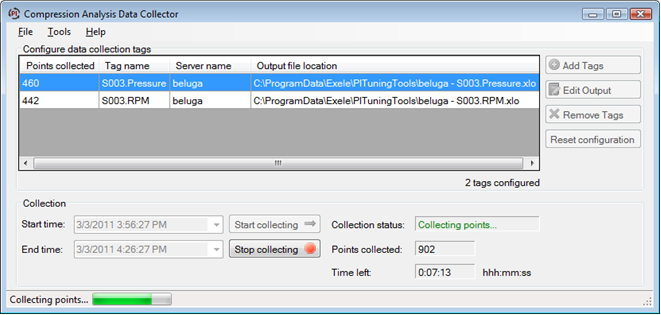
Compression Analysis Data Collector
Collect raw data for PI tags
- Configure desired tags to bypass exceptions. Snapshot now contains each value sent by an Interface (“raw” data)
- The Data Collector monitors the snapshot of configured tags. Each snapshot value is saved locally in a data file.
- Data files can be imported into Compression Analysis to analyze the effect of various compression deviations on the raw data.
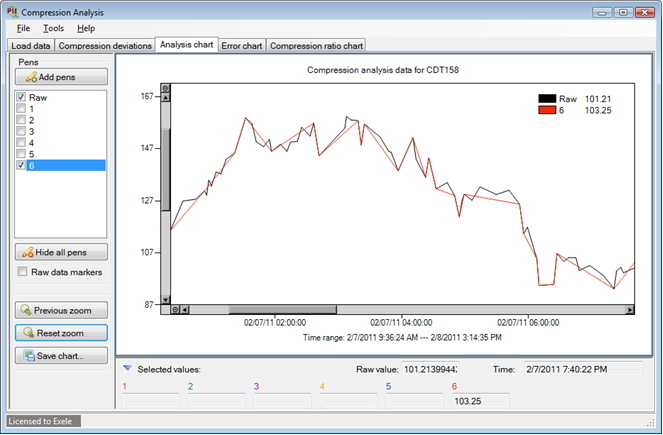
Compression Analysis
See the effects of different Compression settings on raw tag data
- Import raw data from a Compression Analysis data file, a user-created data file, or the archive data of a noisy tag
- Compare raw data to compressed data by entering and analyzing multiple compression deviation settings
- The analysis includes plots of raw vs. compressed, average error, and compression ratios achieved